Your cost per lead just went up. Before you panic, check what happened to the calls your sales team took that week. On most lead generation accounts I look at, the real problem is not the price of a lead. It is Facebook ads lead quality: plenty of form fills, and very few people who were ever going to buy.
This guide explains why Meta sends you weak leads, the three changes that fix it, and the one number you should report instead of cost per lead.
Quick Answer
To improve Facebook ads lead quality, stop asking Meta for the cheapest possible lead. Optimize for a deeper event such as a booked call or a qualified lead, write your ad for one specific customer so the wrong people skip it, and add a small amount of friction before the booking. Your cost per lead will rise. Your cost per qualified call, which is the number that pays you, should fall.
Table of Contents
- Why Facebook Ads Lead Quality Drops
- Step 1: Optimize for a Deeper Event
- Step 2: Tighten the Message
- Step 3: Add Friction on Purpose
- The Number to Report: Cost per Qualified Call
- Common Mistakes to Avoid
- FAQs
- Key Takeaways
Why Facebook Ads Lead Quality Drops
Meta’s delivery system is very good at one thing: finding more of whatever you asked for, at the lowest price. If the campaign is optimized for leads, it looks for people who fill in forms. Some people fill in a lot of forms. They are cheap to reach, quick to submit, and they rarely pick up the phone.
So the dashboard looks healthy while the business gets worse:
- Cost per lead falls and lead volume climbs
- Show rates on booked calls drop
- Close rates drop
- Your sales team spends the day chasing people who do not remember signing up
That is not a sales problem and it is not bad luck. The system delivered exactly what the campaign asked it to find. If you are new to how this kind of buying works, my guide to what performance marketing is covers the basics.
Step 1: Optimize for a Deeper Event
The biggest lever for Facebook ads lead quality is the optimization event. Ask for leads and Meta finds anyone willing to submit a form. Ask for booked calls, qualified leads or purchases, and it looks for a different kind of person.
To do this, Meta has to see what happens after the form. That usually means:
- Sending booked call or qualified lead events from your CRM or booking tool back to Meta
- Using the Conversions API so those events arrive from your server and are not lost in the browser
- Choosing that deeper event as the conversion the ad set optimizes for
Volume matters here. An ad set learns fastest when it gets around 50 optimization events a week. If you only book ten calls a week, optimize for the deepest event you can still hit often enough, such as a completed application, and move deeper as volume grows.
Step 2: Tighten the Message
Your ad is also a filter. An opening line like “Hey busy professionals” filters out nobody, so everybody clicks.
Describe the exact situation your best customer is in instead. Name the industry, the size of the business, the problem and what it is costing them. A clinic owner with empty appointment slots should read the first line and feel it was written for them. A student looking for a free template should read the same line and scroll on.
Specific copy lowers your click-through rate a little and raises the share of clicks that are worth paying for. That is a good trade.
Step 3: Add Friction on Purpose
Most advice about forms tells you to remove every obstacle. For lead quality, a little friction is useful because it asks the lead to show intent.
- Put a short application before the calendar, with two or three questions about budget, timeline and fit
- Use the higher intent form type so people review their details before they submit
- Let the video or page make its full case before the call to action appears
- State the price range or minimum budget if you have one
Each of these loses you some leads. They are mostly the leads your sales team did not want.
The Number to Report: Cost per Qualified Call
After these changes, cost per lead goes up. This is the point where many advertisers lose their nerve and switch everything back. Look at the full math before you do.
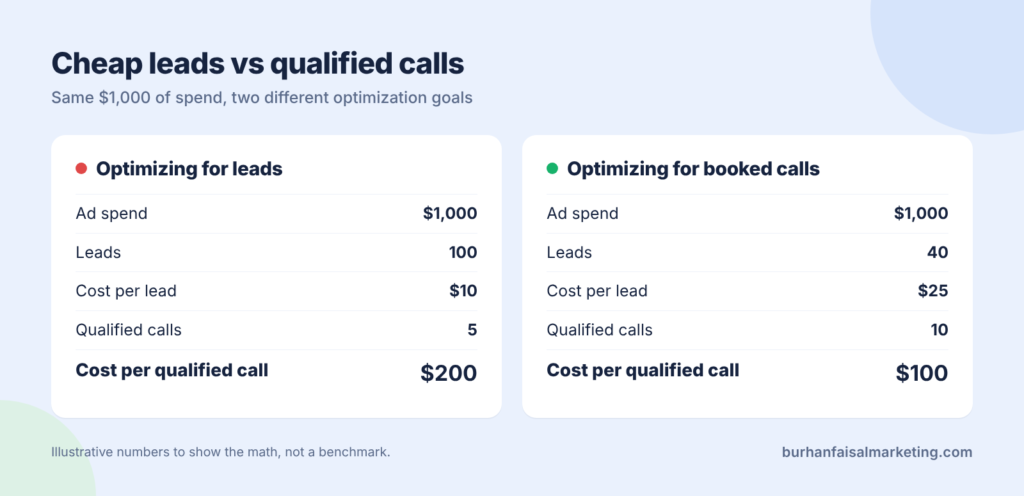
In this example the spend is the same on both sides. The first setup buys 100 leads at $10 and produces 5 qualified calls, so each one costs $200. The second buys 40 leads at $25 and produces 10 qualified calls at $100 each. The campaign with the “expensive” leads is twice as efficient.
Cost per qualified call = Ad spend ÷ Qualified callsCost per lead was never the number that pays you. Report cost per qualified call every week, and cost per customer once you have enough closed deals to trust it. Better Facebook ads lead quality shows up in those two numbers long before it shows up in Ads Manager.
Want Leads Your Sales Team Actually Wants?
Fixing lead quality means changing the optimization event, the tracking behind it and the message, then holding your nerve while the numbers settle. If you would rather have someone who does this every day set it up, that is what I do.
I manage Meta ads for growing businesses and report on qualified calls and customers, not form fills.
Common Mistakes to Avoid
- Judging the change after three days. A new optimization event needs time and data. Give it at least a week or two before you compare.
- Optimizing for an event that almost never happens. If Meta sees five conversions a week, it cannot learn. Pick an event with enough volume.
- Adding ten form questions at once. Friction should filter, not block. Start with two or three questions.
- Leaving sales out of it. Slow follow-up ruins good leads too. Agree on response times before you blame the ads.
- Comparing campaigns on cost per lead. Compare them on cost per qualified call, or you will keep choosing the wrong winner.
FAQs
Usually because the campaign is optimized for the cheapest lead. Meta then finds people who submit forms easily, not people who are likely to buy. Broad messaging and a form with no friction make it worse.
Yes, in most cases. You are asking Meta for a harder result, so each lead costs more. What matters is whether cost per qualified call and cost per customer come down.
Both can work. Instant forms give more volume and need extra qualifying questions. Landing pages usually bring fewer leads with higher intent. Test both against cost per qualified call.
Meta’s guidance is about 50 optimization events in 7 days per ad set. If you cannot reach that, optimize for a step slightly higher in the funnel that still signals intent.
Key Takeaways
- Low lead quality usually comes from what you asked Meta to optimize for
- Optimize for booked calls or qualified leads, not raw form fills
- Write ads that the wrong people can easily ignore
- Add a small amount of friction before the booking
- Report cost per qualified call, not cost per lead
Which number does your team report every Monday? If it is still cost per lead, that is the first thing to change.